
Messages - all in one chat app
FABULOUS APPSCommunication
4.2136.00 Reviews
- Version
- 3.6
- Installs
- 500.00K
- Age Rating
- Everyone
Screenshots
Our Review of Messages - all in one chat app
 Analysis by Appyee
When I want a straightforward way to handle ordinary SMS conversations, I look for an app that gets out of the way rather than trying to turn texting into a social network. Messages - all in one chat app, developed by FABULOUS APPS, takes that simple approach. It is a free communication app for Android, aimed at people who want to read, write, and manage text messages without a complicated learning curve.
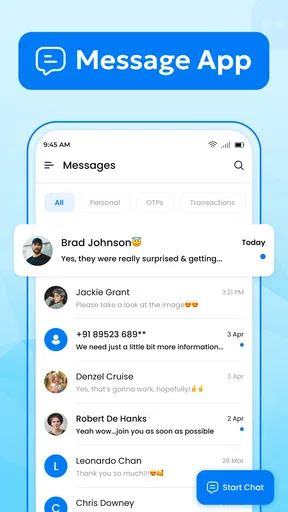
My first impression is that the app is built around familiarity. You open it expecting a list of conversations, choose a contact, write a message, and send it. That sounds basic, but it is exactly the point for anyone who finds feature-heavy messaging tools distracting. The app has a 4.2 average from around 2.8 thousand ratings, and its reach of over 500 thousand installs suggests that many users are comfortable trying it as an alternative SMS messenger.
What to expect from this everyday SMS app
The most important thing to understand is the role this app plays. It is not something I would install expecting a replacement for internet-based services such as WhatsApp, Signal, or Messenger. Its natural home is traditional text messaging: the kind of communication connected to your mobile service and used for short updates, practical arrangements, and conversations with people who may not use the same online platform as you.
That distinction makes it useful in situations where compatibility matters more than extra features. If I need to tell someone that I am running late, confirm an appointment, or send a quick note to a family member, SMS is still convenient because it does not require both people to choose the same chat service. This app gives that familiar activity a dedicated interface instead of making me search through a larger communication platform.
The store presents it as an easy and simple text messenger, and that description matches the general experience without needing exaggerated promises. I found the appeal strongest when I treated it as a practical tool rather than a feature showcase. The less I expected it to do, the more its focused design made sense.
It is also worth setting expectations around conversations. A normal text message and an internet chat are not interchangeable. Delivery behavior, media handling, and the experience on the other person’s phone can depend on the messaging system being used and on the mobile service behind it. For a first-time user, the safest mindset is to begin with a short text to someone you know, check that it appears as expected, and then use the app for the conversations that suit SMS.
The application is marked for Everyone, which fits its accessible purpose. It runs on Android versions from 7.0 onward, so it can be considered by people using older compatible phones as well as more recent devices. Its current version is 3.6, and the app was released on April 19, 2024. Those details matter mainly because they help a new user judge whether the app fits an existing phone before spending time moving into a new messaging routine.
Starting without making the change feel risky
Before I make any messaging app my daily tool, I think about the transition rather than the download itself. The first question is whether I want a separate SMS interface at all. If I already feel comfortable with the messaging app that came with my phone, switching only makes sense if I prefer this app’s layout or want a simpler alternative. There is no benefit in changing merely because another icon is available.
A sensible first step is to install Messages - all in one chat app and open it without immediately trying to reorganize every conversation. I would first look for the familiar conversation list, identify a contact I know, and confirm that the app feels readable. This small check is more useful than judging it from a screenshot because messaging is something I may open many times a day.
Android may ask me to choose which application should handle SMS duties. That is an important moment, not a problem. If I want this app to be the main place where I read and send text messages, I need to follow the system’s default-app choice. If I am only testing it, I can take a slower approach and keep my existing arrangement until I am satisfied. The exact wording can vary by phone, but the underlying idea is the same: Android needs to know which app should respond when a text arrives.
I would also avoid deleting the previous messaging app just because this one is installed. Keeping the old app available during the trial gives me an easy fallback if the layout does not suit me. This is especially helpful for someone who has years of conversations and wants to make sure the new interface feels comfortable before committing to it as the everyday option.
Getting to the first successful message
The clearest first success is not exploring every screen. It is sending one useful message and confirming the conversation appears in the right place afterward. I would choose a trusted contact, write something short such as a simple check-in, and send it. Then I would look for the outgoing message inside the conversation and wait for the recipient to confirm it arrived.
This test answers several practical questions at once. I learn whether the app is using the expected phone number, whether the conversation list is easy to follow, and whether I understand the difference between a message I have composed and one that has actually been sent. It also gives me confidence before I rely on the app for a time-sensitive exchange.
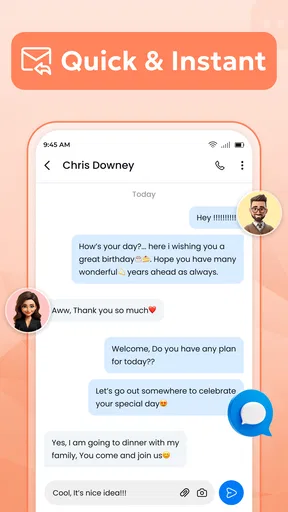
For a first-time user, I recommend beginning with plain text rather than a long message or a complicated attachment. A short message makes any issue easier to identify. If the recipient replies, I can then test the basic rhythm of a conversation: opening the thread, reading the response, and replying from the same screen. That simple loop is the core experience, and it tells me more than browsing through settings.
One useful habit is to keep the conversation list tidy from the start. I would not send test messages to several people just to see what happens. Instead, I would use one known contact and then return to the list to see how the thread is displayed. This helps me recognize the visual pattern for unread and active conversations, which is important when several messages arrive close together.
Another practical tip is to use the app for a real but low-pressure task during the first day. I might message a family member about dinner or confirm a meeting time. That creates a meaningful success without putting an important deadline at risk. Once I know where conversations appear and how replies look, the app becomes much less intimidating.
Where new users may hesitate
The biggest source of confusion is usually not writing the message; it is understanding what belongs to the app and what belongs to Android or the mobile network. If a text does not arrive immediately, that does not automatically mean the interface failed. Network conditions, the recipient’s phone, and the SMS service can all affect the result. I try to separate an app-navigation problem from a delivery problem before changing settings.
Another point that deserves attention is the default messaging choice. If two SMS apps are installed, I can accidentally open one app to read a conversation and the other to send a reply. That can make the message history feel inconsistent even when nothing has been lost. For a clean trial, I would decide which app I want to use for normal texting and keep my activity there rather than switching back and forth casually.
Contacts can also be confusing for first-time users. A conversation may be easier to recognize when the contact is saved with a clear name, while an unsaved number can look unfamiliar in a busy list. Before assuming that a thread is missing, I would search carefully and check whether the message was started from a number rather than a saved contact.
It is equally important not to judge an SMS app by the standards of a modern internet messenger. A person looking for reactions, large group communities, synchronized desktop chats, or rich online calling may find the experience too narrow. This app’s simplicity is an advantage for ordinary texting, but it becomes a limitation when the conversation needs tools beyond SMS.
I also think about privacy expectations before choosing any communication app. Traditional SMS is not the same as an end-to-end encrypted chat service, so someone with sensitive conversations may prefer a dedicated secure messenger. That does not make this app unsuitable; it simply means the right choice depends on the content of the conversation. For routine coordination, SMS can be convenient. For confidential discussions, I would choose a service designed specifically for that purpose.
Small workflows that make it more useful
One of the most useful ways to approach this app is to separate urgent conversations from casual browsing. When I need to send a quick practical note, I can open the conversation list, choose the person, and write directly instead of moving through several unrelated features. This reduces the chance of posting in the wrong place, especially when I am in a hurry.
A second helpful workflow is to use a short first message when contacting someone after a long gap. Rather than sending a large block of text immediately, I can confirm that I have selected the right number and that the conversation is active. If the person replies, I know I am continuing in the correct thread. This is a small habit, but it prevents avoidable confusion when contacts have similar names or multiple numbers.
For family members who are not comfortable with complicated apps, a focused SMS interface can also be easier to explain. I would show them one path: open the conversation, read the latest message, tap the writing area, and send the reply. Keeping the lesson limited to that path is better than overwhelming them with every possible option. The app’s value here is not a special feature; it is the reduced mental load of a familiar task.
There is a trade-off in using a dedicated alternative instead of the phone maker’s default tool. The default app may feel more integrated with the device, while this application may appeal to someone who prefers its simpler presentation. I would compare them using actual daily actions: finding an old thread, replying to a recent message, and starting a new conversation. The better choice is the one that lets me complete those tasks with less hesitation.
Another realistic scenario is coordinating a last-minute change to plans. Suppose I am leaving work later than expected and need to tell someone waiting for me. I can open the relevant conversation, send a concise update, and return to the thread when the reply arrives. In that situation, the app succeeds because it keeps attention on the message rather than surrounding the task with unrelated content.
For users who send many texts, I would take a little time to notice how the conversation list behaves as it grows. A clean list is easier to scan than one filled with abandoned test threads. I would use real conversations for testing, avoid unnecessary duplicates, and periodically review which threads I actually return to. This is not a glamorous tip, but it has a direct effect on how quickly I can find the right person later.
How it compares with familiar alternatives
Compared with an internet-first messenger, this app is more universal in one specific sense: the recipient does not need to install the same service for a basic SMS exchange. That makes it practical for contacts with different phones, habits, or app preferences. The cost of that convenience is that SMS does not offer the same online communication environment as services built around accounts and data connections.
Compared with the standard messaging app already on an Android phone, the decision is more personal. The built-in option may be the easiest choice for someone who wants the deepest connection with the phone’s existing behavior. Messages - all in one chat app is more appealing when I prefer its focused approach or simply want to try a different way of handling texts. I would not expect a dramatic transformation; the benefit is in everyday comfort and clarity.
Compared with privacy-focused messengers, this app serves a different purpose. A secure chat service may be the better option for sensitive conversations, provided the other person uses it too. This application is stronger when reach and simplicity matter more than a specialized privacy model. Knowing that distinction prevents disappointment and helps me choose the right tool for each contact.
The same comparison applies to group communication. If a group depends on shared photos, online status, reactions, or ongoing community features, a dedicated internet messenger will probably feel more capable. If the group only needs short practical updates and everyone can receive texts, this app may be enough. I prefer that clear boundary to pretending one tool is ideal for every kind of conversation.
Who should try it, and who should look elsewhere
I would recommend this app to someone who wants a free, uncomplicated way to handle SMS on a compatible Android phone. It is particularly suitable for first-time users who value a direct conversation list, people who regularly text contacts across different devices, and anyone who wants to test an alternative to the phone’s usual messaging interface without learning a large online platform.
It can also suit households where one person needs a simple texting routine. The app’s Everyone age classification reflects that accessible positioning, although younger users should still follow the communication and phone-use guidance set by their family. The important point is that the app is easy to approach: the first useful action is simply choosing a conversation and sending a message.
I would suggest skipping it if the main reason for switching is advanced online chat. People who need encrypted conversations, rich media collaboration, voice or video communication, or a broad group ecosystem should look at services designed around those needs. I would also hesitate to switch if the existing default SMS app already feels clear and reliable; installing another tool will not automatically improve a routine that is already working.
Users on Android versions below 7.0 should not plan around this application, since the stated minimum requirement begins there. For compatible devices, the free price removes the financial barrier to trying it, but time and habit are still worth considering. A few minutes of testing with one trusted contact is enough to decide whether the interface feels better than the current alternative.
My practical verdict after using it
Messages - all in one chat app succeeds by keeping its promise narrow. I see it as a calm, approachable option for ordinary SMS rather than a competitor to every communication service on a phone. The path from installation to a useful result is reassuring: open the app, understand the conversation list, choose one contact, send a short message, and confirm the reply.
Its limitations are also clear. It will not be my first choice for private discussions that require a specialized security model, and it cannot replace the wider features of an internet-based messenger when a group needs more than text. Those are not flaws in the basic idea, but they are important boundaries to recognize before making it my main communication tool.
My recommendation is to treat the app as a focused SMS experiment. Keep the existing messaging option available while testing it, make one real low-pressure exchange, and judge the app by how easily you can repeat that action the next day. If you want a free and uncomplicated text-message experience on Android, this is a sensible option to try. If your conversations demand rich online features or stronger privacy controls, another category of messenger will be a better fit.
For me, the strongest reason to keep it installed is not novelty. It is the straightforward feeling of opening a communication app with one clear job and knowing exactly where to begin. That makes it a practical recommendation for people who want texting to remain simple.
Verdict
Strengths of Messages - all in one chat app
- Combines several messaging services in one convenient inbox.
- Reduces the need to switch between multiple chat applications.
- Supports quick access to conversations from different platforms.
- Useful for managing personal and work chats in one place.
- Can simplify notifications when handling many messaging accounts.
Limitations of Messages - all in one chat app
- Some services may have limited features compared with their official apps.
- Privacy policies can vary because messages pass through a third-party app.
- A single app issue could affect access to several chat services.
- May require multiple account permissions to work correctly.
- Battery and memory use may increase with many active conversations.
Similar Picks in This Category
View All
Google Messages
Google LLC4.6

Gmail
Google LLC4.1

Google Meet
Google LLC4.4

Google Chrome
Google LLC4.1

WhatsApp Messenger
WhatsApp LLC4.6

Carrier Services
Google LLC4.2
Frequently Asked Questions
What is Messages - all in one chat app?
Messages - all in one chat app is designed to bring different messaging services together in one convenient interface. Instead of switching between several applications, users can access conversations and communication tools from a centralized location. Before downloading, check which services are supported, whether the app is officially maintained, and if your device meets its compatibility requirements.
Is Messages - all in one chat app free to download and use?
The application may be available to download at no initial cost, but the overall experience can depend on optional purchases, advertising, or premium features. Some integrated services may also require their own subscriptions or accounts. We recommend reviewing the app-store listing carefully to understand possible in-app purchases, payment conditions, and whether any features are restricted in the free version.
Does the app support all popular messaging platforms?
Not necessarily. An all-in-one messaging application can only include services that it officially supports, and compatibility may vary by country, operating system, or app version. Some platforms may offer limited functionality, such as reading messages without access to calls or advanced settings. Check the current supported-services list before installing if you depend on a particular messenger.
Is Messages - all in one chat app safe and private?
Privacy depends on how the application connects to other messaging services and what permissions it requests. Users should review its privacy policy, data-collection disclosures, and required access to notifications, contacts, storage, or account information. Avoid entering sensitive credentials unless the service is trustworthy, and enable device security features such as a screen lock and two-factor authentication where available.
What should I do if notifications or messages do not work correctly?
Problems can occur when battery optimization, notification permissions, background restrictions, or third-party service updates interfere with the app. After installation, allow the necessary notifications, keep the application updated, and confirm that the connected messaging services are working independently. If issues continue, restart the app and device, review permissions, and consult the developer’s support information before reinstalling.
